
Agenetix product model
Understand how Generate, Gateway, Host, Agents, Embed, SDKs, and CLI fit together.
Agenetix is production infrastructure for MCP agents. The product model is a layered system:
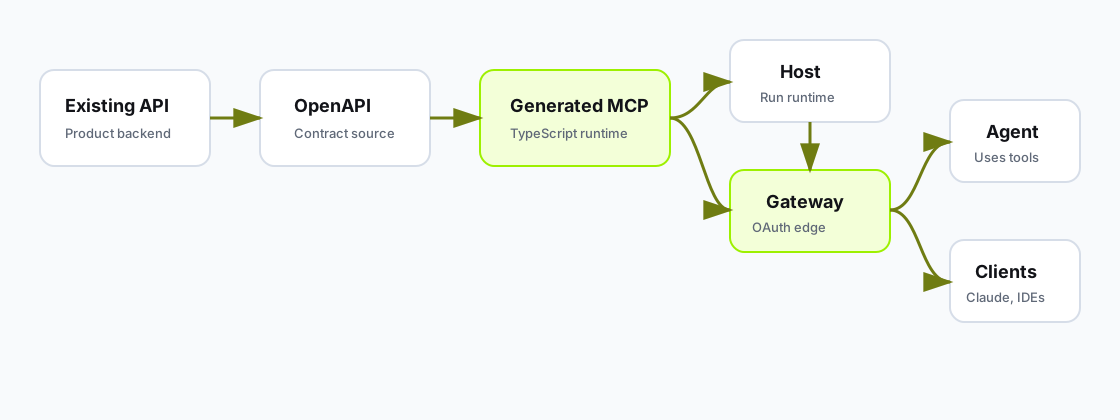
Agenetix starts with an API surface, produces or connects MCP tools, adds Gateway when identity matters, optionally hosts generated runtimes, and exposes those tools to agents or external clients.
Generate is the Agenetix OpenAPI import path. Use the dashboard wizard or mcpstack servers create to turn a spec into a hosted MCP runtime.
It:
Generate is the primary way to convert an existing API into an MCP tool surface.
Gateway is the OAuth edge you attach to a server. Host serves the MCP URL; Gateway adds the identity layer in front of it.
It:
Gateway is the right layer when the API is protected by OAuth, OIDC, HTTP bearer, or any user-scoped identity boundary.
Host runs generated OpenAPI MCP runtimes for you.
It:
/mcp.Host is for teams that want Agenetix to operate the generated runtime rather than asking their own platform team to run it.
Agents are configured assistants that use MCP servers as tools.
An agent has:
Agents are the bridge between tool infrastructure and real user experiences.
At the frontend boundary, Agenetix Agents expose AG-UI. AgentSDK is Agenetix's first-party AG-UI client, and custom AG-UI clients can connect to the same agent run interface.
Embed is the in-product agent surface exposed through @agenetix/agent-sdk.
It:
userIdentity.appSessionKey.frontendTools as AG-UI frontend tools so the agent can orchestrate UI and app actions.Embed is how a SaaS product ships an assistant that acts as the signed-in user.
Agenetix also exposes developer surfaces:
@agenetix/cli (mcpstack): create servers, manage Host, Gateway, tools, agents, smoke tests, and logs.@agenetix/sdk: telemetry for tool invocations in MCP runtimes.@agenetix/agent-sdk: React, React Native, and headless App Agent integration.The public npm packages use the @mcpstack scope, and the public APIs use Agenetix naming.
Gateway and Host are separate:
You can have a generated runtime without Gateway when the API is public or uses Static Headers. You should add Gateway when the runtime needs user-scoped OAuth or external MCP clients need discovery metadata.
In one sentence:
Agenetix turns APIs into MCP tools, puts Gateway in front when OAuth and public client discovery are needed, hosts generated runtimes when you want managed publishing, and lets you attach those servers to agents or embed the agent in your app.
Which layer you start with depends on what you already have: an OpenAPI spec, a running MCP server, an OAuth provider, or an app where you want to embed the assistant.